🍎 macOS Native#
Blender and the solver both run on the same Apple-silicon Mac, and the
add-on starts the solver itself. ppf-cts-server is launched as a child
process and reached over a loopback TCP socket; no SSH and no Docker.
The root you point it at is either the extracted macOS Native distribution from GitHub Releases, which carries the Metal and CPU backends and needs no Python, Homebrew, or Xcode installation, or a checkout you built.
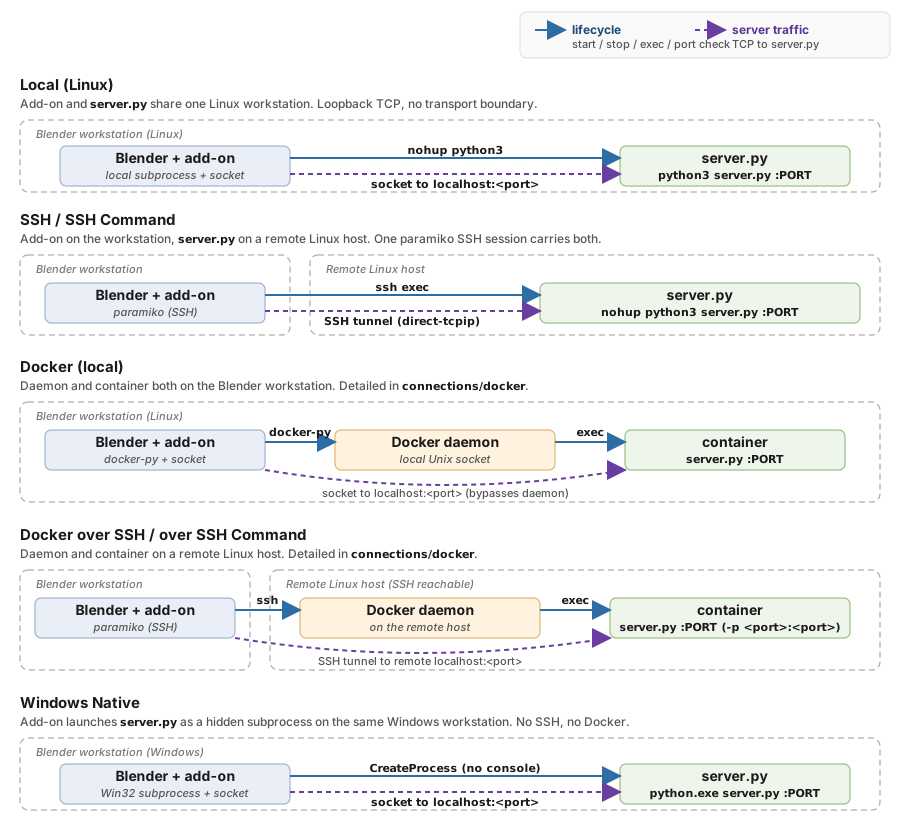
macOS Native is the first row: everything on one machine, the add-on
spawning ppf-cts-server as a child process (blue solid arrow) and
talking to it over a loopback socket (purple dashed arrow). Linux
Native has the same shape; see Linux Native.#
When to Use It#
An Apple-silicon Mac running Blender, where the Metal build can run the solve on the same machine.
Evaluation, learning, and small examples. Metal trails a modern discrete NVIDIA or AMD GPU by a wide margin; mid to large scenes still want one of those, reached over SSH or Docker over SSH.
A Mac with no Metal-capable device available, where the CPU build runs instead.
Setup#
Set Type to
macOS Native.Set Solver Path to the root of the distribution or checkout – the directory that has
target/release/ppf-cts-serverin it. Picking a subfolder such astargetortarget/releaseis fine: the add-on walks up to the real root and names the one it used on the line below the field.Set Compute Device:
GPUruns the Metal build andCPUthe portable one. See Choosing the build.Set Project Name on the main panel.
Click Connect. This resolves the root and refuses one that holds no build for the device you picked, naming the folder it looked in. It does not start the server.
Click Start Server on Remote. The add-on clears the Gatekeeper quarantine mark if the folder needs it, spawns
ppf-cts-server, and waits up to 16 seconds for it to answer the solver protocol. If appf-cts-serverfrom a previous Blender session is still listening on the port, the add-on attaches to it instead of launching a second one.
Fields#
Field |
Description |
|---|---|
Solver Path |
Root directory holding |
Compute Device |
|
No GPU Backend row is drawn on this type: an Apple-silicon Mac has one accelerator, so a CUDA-or-ROCm choice could never mean anything here. No GPU picker is drawn either – the Metal build opens the system default device and offers no way to name another, so there is nothing to pick. See Picking a GPU.
The panel does not draw a server port field on this type – the port
field is drawn only for the Docker-family types – so the port used
here is whatever the shared port property currently holds, 9090 by
default. Set it from a Docker mode and switch back, or give an entry
its own with a connection profile’s docker_port key.
Troubleshooting#
ppf-cts-server not found under <root>– the selection is not inside a solver root. A subfolder is resolved upward automatically, so this usually means the folder you picked is the one you extracted the archive into rather than the archive root. If you are building from source, runcargo build --release -p ppf-cts-serverfirst.<root> holds the CPU build of the solver and no GPU build(or the reverse) – the folder is right and Compute Device is not. Set it to the build that is there, or point Solver Path at a folder that has the one you want.N entries under <root> are still marked com.apple.quarantine– printed as a warning when the add-on could not clear the download mark, which is what a folder owned by another user or on a read-only volume looks like. Move the distribution somewhere you own, or clear it yourself withxattr -s -d -r com.apple.quarantine "<root>".A solver server is already running on port N, and its runs use the build in ...– Start Server on Remote found a server it did not launch, running a different build from the one selected. See Attaching to a running server.Server startup timed out. – the solver launched but did not answer within 16 seconds. Check
server.login the solver root; the panel prints its last 20 lines when the timeout fires.Port N is in use– something other than appf-cts-serverthe add-on recognizes is bound to the port. Use the Force Terminate Process button shown next to the error.
Under the hood
Gatekeeper quarantine
macOS marks every file extracted from a download, and a marked binary
is stopped when it is loaded rather than when it is started, so
clearing the mark on the server alone would move the failure into the
backend dylib or the build worker’s first import. Before spawning, the
add-on clears com.apple.quarantine from the whole selected folder,
and only for a packaged distribution, which it recognizes by the
.ppf-selfcontained marker the bundler writes. A developer checkout is
never downloaded as a unit and is never marked.
The clearing never blocks the connection and never claims more than it
did: the marked entries are counted again afterwards, so a folder that
could not be written reports what is still marked rather than a success
it did not have. A distribution’s own launcher does the same thing at
startup, but this backend never runs that launcher – it spawns
ppf-cts-server out of the folder directly – which is why the add-on
has to do it too.
Which Python the build worker runs under
The interpreter belongs to the folder, not to the machine. A
distribution ships its own at <root>/python/bin/python3 with the
frontend dependencies already installed into it; a checkout ships none
and uses the developer environment at
~/.local/share/ppf-cts/venv/bin/python. It is named explicitly in
PPF_CTS_BUILD_PYTHON rather than left to PATH, because macOS ships
Python 3.9 as its system python3 and the frontend does not parse
under it. An inherited PPF_CTS_BUILD_PYTHON wins, and VIRTUAL_ENV
is set alongside it only when the interpreter really is a venv (decided
by pyvenv.cfg, not by the path), so a venv that happened to be active
in the shell that started Blender cannot contradict the interpreter
actually chosen.
No library search path is set
The solver binary carries an LC_RPATH and the Metal backend dylib an
@rpath install name, so each resolves the other on its own.
Subprocess environment
PYTHONPATHbegins with<root>so the build worker can import the project’s Python modules.CARGO_TARGET_DIRnames the target directory the resolved server came out of, so the build worker’s cdylib and the session’sSOLVER_PATHcome from the same build as the server.No
CUDA_VISIBLE_DEVICES: there is no CUDA here and no device selection to carry.
Server log file
The child’s stdout and stderr are redirected to server.log in the
solver root, opened in append-binary mode, for the same reason the
other natives do it: nothing in the add-on drains a pipe, and a full
pipe buffer wedges the server’s async runtime.
Stop and disconnect
Disconnect leaves the server running on purpose, so the next Connect attaches to it rather than fighting for the port. Stop Server on Remote ends it, scoped to this connection’s port rather than to the binary’s name.
File transfer fast path
Transfers copy directly on disk instead of going through the solver TCP
socket, so the panel shows no bandwidth figure while one runs. Set
PPF_FORCE_TCP_TRANSFER=1 in the environment to force the socket path.