🪟 Windows Native#
The solver runs directly as a Windows subprocess. The add-on launches
the ppf-cts-server.exe binary alongside Blender and talks to it over a
local TCP socket. A bundled Python interpreter and (optionally) a
bundled CUDA runtime ship next to the binary, since the Rust server
spawns a Python build worker that loads the _ppf_cts_py PyO3 module.
No SSH or Docker is involved.
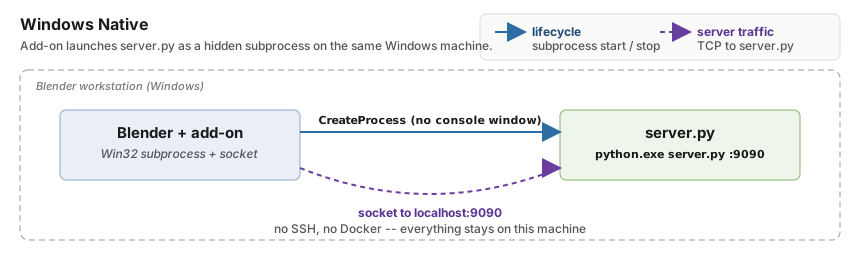
Where each piece lives, and how the add-on reaches it. The add-on
launches ppf-cts-server.exe as a hidden subprocess via CreateProcess
(blue solid arrow) and then talks to it over a loopback TCP socket
(purple dashed arrow). Everything stays on the same Windows machine: no
SSH and no Docker.#
Note
Unlike the Local (Linux) backend, the Windows Native build ships
as a self-contained tree: the embedded Python interpreter, CUDA runtime, Rust
solver binaries, and all third-party shared libraries live entirely under the
install root. Nothing is installed into the system, no apt packages, no
shell rc edits, no global services. Uninstalling is just deleting the
bundled directory; there is no contamination of the host to clean up.
When to Use It#
User workstations running Blender on Windows with a local NVIDIA GPU.
Bundled deployments that ship the solver next to the add-on.
Reproducible test rigs where you want the exact shipped Python + CUDA, not whatever the system has.
Setup#
Set Type to
Windows Native.Set Solver Path to the root of your solver install. This is the directory that contains
ppf-cts-server.exeundertarget\release\(developer build) or underbin\(shipped bundle), plus either apython\subfolder (redistributable bundle) or abuild-win-native\python\subfolder (developer build). Picking a subfolder such astarget\release,bin, orpythonis fine: the add-on walks up to the real root and names the one it used.Click Connect. The add-on resolves the solver root and refuses one with no
ppf-cts-server.exeunder it. Connecting does not start the server.Click Start Server on Remote. The add-on picks up the right Python runtime and launches the solver as a hidden subprocess on the configured port (
9090by default). If appf-cts-serverfrom a previous Blender session is still listening on that port, the add-on attaches to it instead of launching a second one. The GPU picker is filled in over the connection, so this step is also where the selected device is applied. If the path is deep enough that the cache files the pipeline writes would exceed Windows’ 260-character limit, the panel warns under Solver Path with Path too long: cache files reach N chars (Windows limit 260). The warning does not block Connect or Start Server on Remote; the failure would otherwise surface as a cache write error during a later Transfer. Move the solver to a shorter path or enable Windows long paths.
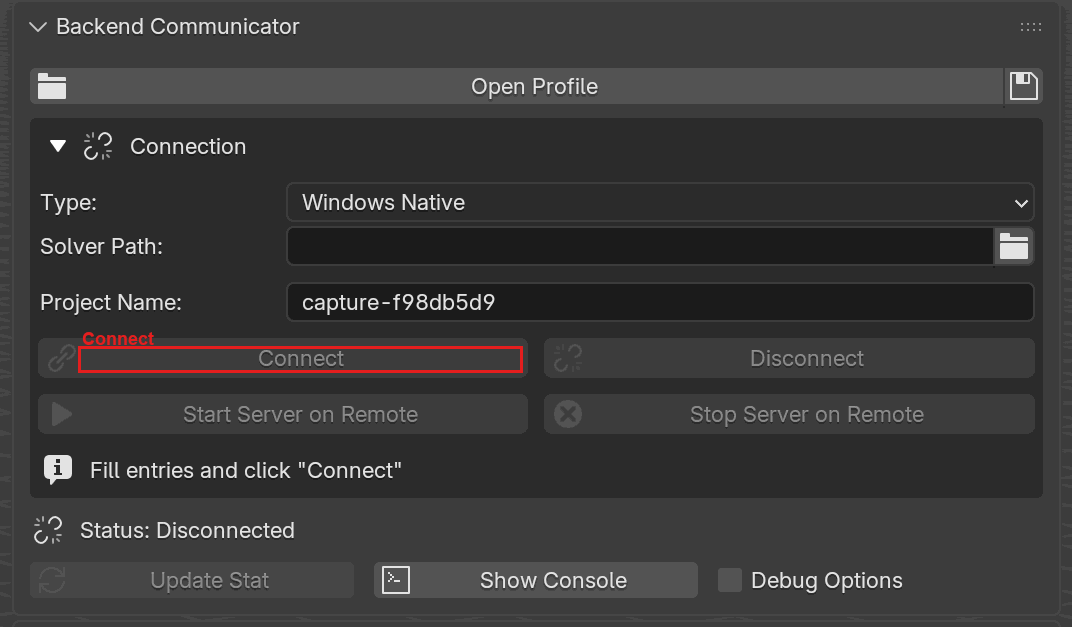
Backend Communicator with Type set to Windows Native.
Only Solver Path and Project Name appear, with no SSH or Docker
fields. Connect is highlighted.#
Fields#
Field |
Description |
|---|---|
Solver Path |
Root directory containing |
Troubleshooting#
ppf-cts-server.exe not found under <root>- the selection is not inside a solver root at all. A subfolder (target\release,bin,python) is resolved upward automatically, so this means the folder you picked is the one you extracted the bundle into rather than the bundle root, or you picked the.zip. If you are building from source, runcargo build --release -p ppf-cts-serverfirst.Embedded Python not found ...- the add-on could not find a Python runtime under the root. Either rebuild the dev tree, or download and unpack the bundle zip.CUDA DLL load errors - on the shipped bundle, the solver relies on the system CUDA runtime. Install a matching CUDA version, or switch to the developer build which ships its own CUDA.
Port N is in use- something is already bound to the configured server port and it is not appf-cts-serverthe add-on recognizes. Use the Force Terminate Process button shown next to the error to kill the listener. The port is the shared port property, which this mode does not draw, so changing it instead means setting it from a Docker mode or through a profile’sdocker_portkey. The add-on auto-attaches to an already-runningppf-cts-server, so this error means the listener is a different process.Server output not visible - stdout and stderr go to
server.login the solver root, not to a console. Open that file when diagnosing startup failures.
Under the hood
Layout auto-detection
Start Server picks one of two layouts by looking for python.exe:
Dev layout
<root>/
  build-win-native/
    python/python.exe
    cuda/bin/*.dll
  target/release/          # ppf-cts-server.exe and other Rust binaries
  src/cpp/build/lib/
Used when you built the solver from source. The ppf-cts-server.exe
binary lives at target\release\ppf-cts-server.exe. The Python
interpreter is build-win-native\python\python.exe, CUDA_PATH is set
to build-win-native\cuda, and the launcher prepends, in order,
build-win-native\python, target\release, src\cpp\build\lib, and
build-win-native\cuda\bin to PATH.
Bundle layout
<root>/
  bin/                     # ppf-cts-server.exe and native shared libraries
  python/python.exe
Used by a shipped redistributable. The ppf-cts-server.exe binary lives
at bin\ppf-cts-server.exe. The Python interpreter is
root\python\python.exe, CUDA_PATH is not set (CUDA is expected on
the system PATH), and the launcher prepends root\python, root\bin,
and root\target\release.
If neither interpreter is present, Start Server fails with:
Embedded Python not found in <build_dir> or <root>
Subprocess environment
The subprocess inherits your current environment with a few additions:
PATHis prepended with the layout-specific directories above; the existingPATHis appended so system tools still work.PYTHONPATHbegins with<root>so the build worker spawned byppf-cts-server.execan import_ppf_cts_pyand other Python modules.CUDA_PATHis added on the dev layout only.
Launch flags
The solver is launched as ppf-cts-server.exe --port <port> with no
visible console window, so nothing appears behind Blender.
Server log file
The subprocess’s stdout and stderr are redirected to server.log in the
solver root, opened in append-binary mode. Writing to a real file rather
than subprocess.PIPE avoids a Windows-specific wedge: the OS pipe
buffer is small, and once the server’s log4rs console appender fills
it, every subsequent write blocks the tokio worker that emitted it,
which eventually freezes the runtime. Redirecting to a file removes the
back-pressure path entirely. The same log is what the panel tails when
the readiness wait times out.
Attach to an already-running server
If a ppf-cts-server.exe from a previous Blender session is still listening
on the port, Start Server on Remote sends a TCMD probe and reuses that
server instead of failing with Port N is in use. The probe checks that the
response is valid JSON containing protocol_version, so a non-server
listener (for example a notebook server parked on the port) still surfaces
as an error. In attach mode the add-on holds no process handle, so Stop
Server on Remote falls back to
taskkill /F /IM ppf-cts-server.exe, which stops the adopted server
(along with any other instance). A foreign listener is cleared with the
Force Terminate Process button instead.
Shutdown
On disconnect (or Stop Server on Remote), the add-on asks the subprocess
to terminate and waits up to 5 seconds; if it is still alive, it is killed.
The Unix pkill -f ppf-cts-server path is not used; the backend holds the
Windows process handle directly.
What Start Server does
Start Server is what spawns ppf-cts-server.exe (or attaches to one
already listening on the port), then waits up to 16 seconds for it to
answer a TCMD probe. It is also where the GPU selection is applied, as
CUDA_VISIBLE_DEVICES on the child’s environment, so moving a running
solver to another device is Stop Server, pick, Start Server.