🔄 Workflow#
Once you have a running solver and a live connection (see Connections if you haven’t set that up yet), the day-to-day loop is:
Organize your scene into object groups: Solid, Shell, Rod, PDRD, Sand, or Static.
Assign material parameters per group (density, Young’s modulus, Poisson ratio, friction, bend, shrink, strain limit, and so on).
Set scene parameters: gravity, wind, time step, frame count, air density, air friction.
Add pins and attach operations: Move By, Spin, Scale, or Torque. (Keyframing a pin by hand attaches Embedded Move for you; it is not offered in the Add menu.)
(Optional) Add invisible colliders: infinite walls or parametric spheres (including bowl / inverted sphere variants).
(Optional) Snap and merge overlapping meshes to stitch them across group boundaries.
Transfer geometry and parameters to the solver; the build runs on the remote automatically once the upload completes.
Run the simulation and Fetch frames back as PC2 animation on your Blender objects.
(Optional) Bake the fetched animation onto the objects as standard Blender keyframes, so the scene plays back without the add-on.
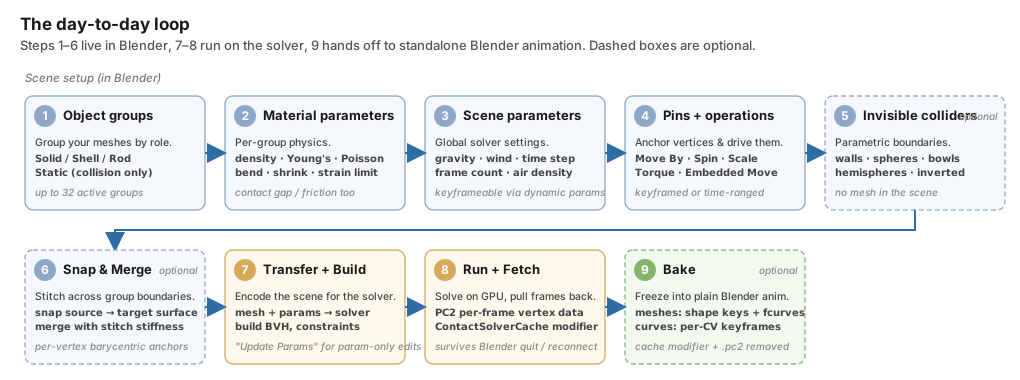
The same nine steps, laid out by phase. Steps 1 through 6 are scene setup in Blender, 7 and 8 are the solve on the GPU, and 9 hands the result off as self-contained Blender animation. In practice you bounce between Run and the material / scene parameters many times before baking.#
Step 8 can also happen entirely from JupyterLab, including with Blender closed. See JupyterLab for the full export → simulate → relaunch Blender → fetch loop.
Coordinate System#
Blender is Z-up; the solver is Y-up. The add-on converts in both directions
automatically. A Blender vector (x, y, z) is sent to the solver as
[x, z, -y], and results are flipped back on fetch. You only need to think
about this when you read raw solver output. Everything visible in Blender
(pin centers, gravity arrows, overlay previews, baked animation) is already
in Z-up.
![Side-by-side diagram of Blender's Z-up right-handed coordinate frame and the solver's Y-up right-handed frame, linked by arrows showing the encode conversion (x, y, z) -> [x, z, -y] and the decode conversion [X, Y, Z] -> (X, -Z, Y)](../../_images/coordinate_system.svg)
Both frames are right-handed. On the encode side, Blender’s Y (into
the scene) becomes the solver’s -Z, and Blender’s Z (up) becomes the
solver’s Y. On fetch the conversion runs in reverse, so everything
read back on Blender meshes, pins, and overlays stays in Z-up.#
Note
The solver stores vertices in untranslated object space (rotation + scale only) with object translation tracked separately. Any absolute coordinate you supply through the Python API (pin centers, operation pivots, collider positions) is transformed into that space at encode time. You do not need to pre-subtract the origin.
Where Parameters Live#
Each sidebar panel maps to one chapter below:
Panel |
What’s there |
Docs |
|---|---|---|
Scene Configuration |
Global sim params: gravity, time step, frame count, CG tolerances, air density / friction, auto-save. |
|
Scene Configuration (keyframed sliders) |
Gravity, wind, air density, air friction, vertex air damping, step size, and inactive momentum frames are keyframed on their own sliders, so the curves sit on the timeline with every other keyframe. |
|
Dynamics Groups |
Per-group type, material model, densities, moduli, contact gap, overlay color. |
|
Dynamics Groups → Pins (Pins & Motion on PDRD) |
Pins and their list of operations (Move By / Spin / Scale / Torque, plus the auto-attached Embedded Move). A PDRD group’s Pins & Motion section offers only two motion steps, Translate and Rotate. |
|
Dynamics Groups → Transform (Static only) |
Per-object Move By / Spin / Scale ops, or Blender transform keyframes. |
|
Scene Configuration → Invisible Colliders |
Walls and spheres with keyframed position / radius. |
|
Snap and Merge |
Snap/merge pairs with optional stitch stiffness. |
Note
Everything reachable from the Scene Configuration panel is also
reachable from a fluent Blender Python API. See the
Blender Python API reference for the
full surface; each chapter below also ends with a short
## Blender Python API section covering the calls relevant to that
chapter.
Blender Python API#
The same workflow is available from Python. Import solver and read or
write through solver.param, solver.create_group(...),
solver.add_wall(...), and friends:
from bl_ext.user_default.ppf_contact_solver.ops.api import solver

solver.param.gravity = (0, 0, -9.8)
cloth = solver.create_group("Cloth", "SHELL")
cloth.add("Shirt")
Under the hood
All add-on data hangs off scene.zozo_contact_solver:
Lives on |
What’s there |
|---|---|
|
Global sim params: gravity, dt, frame count, CG tolerances, air density/friction, auto-save. |
|
Legacy keyframe list; converted to slider F-curves on load, then left empty. |
|
Per-group type, material model, densities, moduli, contact gap, overlay color. |
|
Pins and their list of operations (MOVE_BY / SPIN / SCALE / TORQUE / EMBEDDED_MOVE). |
|
Walls and spheres with keyframed position / radius. |
|
Snap/merge pairs with optional stitch stiffness. |