🐳 Docker (Local)#
The solver runs inside a Docker container on the same machine as Blender, managed by the local Docker daemon. For a remote container reached over SSH, see Docker over SSH.
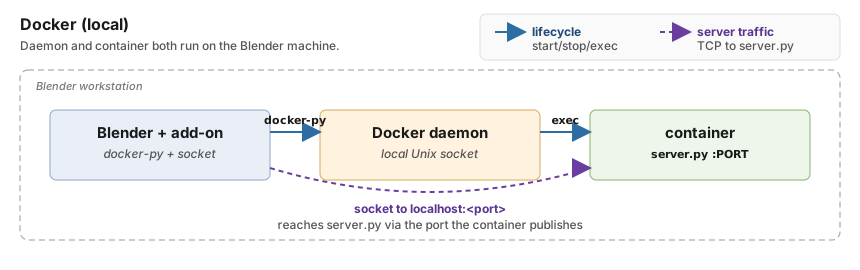
Where each piece lives, and how the add-on reaches it, in local Docker
mode. Blue solid arrows carry lifecycle commands (container
start/stop, exec). Purple dashed arrows carry the TCP connection to
ppf-cts-server. The container must publish the server port: that is
what lets the socket reach ppf-cts-server. For the remote variant where
the daemon and container live on a different host, see
Docker over SSH.#
When to Use It#
The solver depends on CUDA/driver versions you do not want to install on the host.
You want each project isolated on the workstation.
Setup#
Set Type to
Docker.Fill Container with the Docker container name (default
ppf-contact-solver, the name the README’sdocker runcreates). The container must already exist on the daemon; the add-on will start it if it is stopped, but it will not create one.Fill Container Path with the working directory inside the container (for example
/root/ppf-contact-solver). This is the directory containing theppf-cts-serverbinary, not a path on the Blender host.Set Docker Port to the TCP port
ppf-cts-serverlistens on inside the container (default9090).Click Connect. If the container exists but is stopped, the add-on starts it for you. A missing container is reported as an error, and so is a container that does not publish the server port.
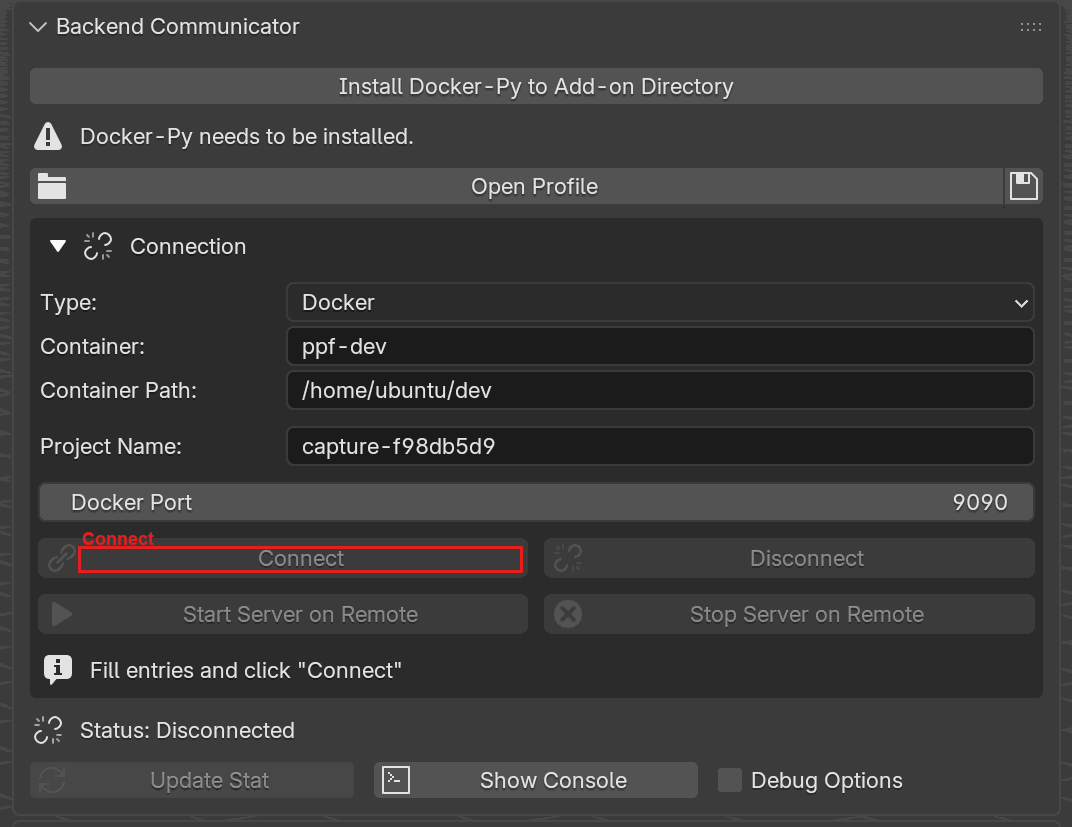
Backend Communicator with Type set to Docker.
Container, Container Path, and Docker Port replace the SSH
fields. The Install Docker-Py banner appears when the docker
module is not installed. Connect is highlighted.#
Fields#
Field |
Description |
|---|---|
Container |
Docker container name (default |
Container Path |
Working directory inside the container that holds |
Docker Port |
TCP port inside the container where |
Two more rows appear in the Connection box once you are connected:
Compute Device (GPU or CPU) and, where the container holds more
than one GPU build, GPU Backend (Automatic, CUDA, or ROCm).
The builds are inside the container, so the add-on lists them with one
command at Connect and caches the answer; the choice is applied at
Start Server on Remote. See
Choosing the build.
Installing docker-py#
The Docker backend requires the docker Python package (sometimes
called docker-py). When it is missing the main panel shows an
Install Docker-Py to Add-on Directory button that installs the package into
Blender’s user scripts/addons/modules directory on a background thread.
Troubleshooting#
Container 'X' does not exist.- the name is wrong or the container was removed. Rundocker ps -ato see what is actually there.Error starting container 'X'- the daemon returned a non-zero exit or the user lacksdockergroup membership.Container 'X' does not publish port N to this machine ...- the container was created without-p N:N, so nothing forwards the server port to the host. Recreate it with the flag; the add-on cannot publish a port on a container that already exists.Server startup timed out. - the container started but
ppf-cts-serverdid not become ready within 16 seconds. Checkserver.loginside the directory set in Container Path; the panel prints the last 20 lines automatically.docker-pynot found - click Install Docker-Py to Add-on Directory on the main panel and wait for the background installer to finish.
Under the hood
Transport
The local backend talks to the Docker daemon through the standard
docker Python client and looks up the container by name. A stopped
container is started automatically; a missing container aborts connect
with Container 'X' does not exist.
Server startup path
Local Docker uses the same Unix server-launch path as the SSH backends
(see Connections - Under the hood):
a small script inside the container launches the ppf-cts-server that
Compute Device and GPU Backend resolve to, on the configured
port, and the UI waits up to 16 s for readiness. Local Docker checks the
published port as well, but at Connect rather than before Start
Server, and it reads the container’s own port map through docker-py
instead of shelling out to docker port. A container on
--network host publishes nothing and is accepted as is.